
Introduction
A page can be well written, properly structured, and still never show up where it should, simply because Google never fully understood it in the first place. We have opened audits for businesses convinced their content was underperforming, only to find the real issue was that search engines could barely access half the site to begin with.
These problems rarely show up as an obvious red flag. A slow loading page still loads. A page with no internal links still exists on the site. Nothing looks broken to a visitor. But to a search engine trying to decide whether a page deserves to rank, these small gaps are often the entire difference between visibility and being quietly ignored.
Get A Free Technical SEO Audit
Why Search Visibility Starts with Technical SEO?
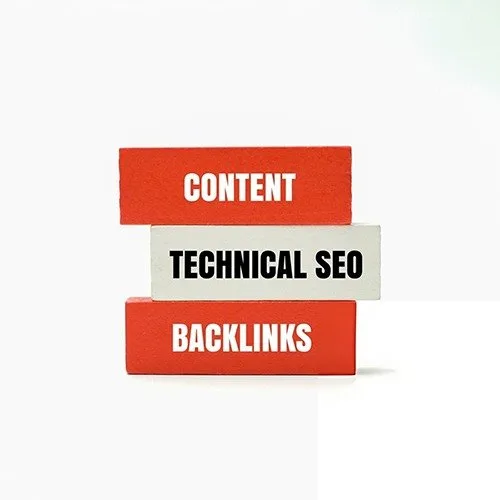
Technical SEO covers the infrastructure underneath everything else in search. Where on page SEO deals with what is written on a page and off page SEO deals with who links to it, technical SEO determines whether Google can access the page at all, and whether it can understand what that page is about once it gets there.
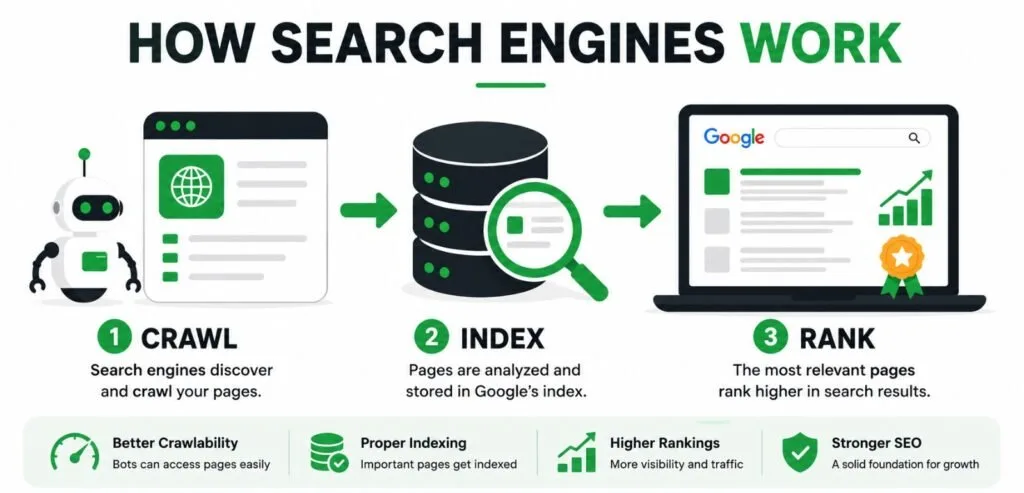
This comes down to three things working together: crawlability, whether search engines can reach and read a page, indexability, whether that page is allowed to appear in search results, and rendering, whether it actually loads and displays correctly once found. A site can crawl fine and still underperform if pages render slowly or a setting accidentally blocks indexing.
For example, we’ve audited websites where important service pages were accidentally blocked by a noindex tag left behind after a website redesign. The pages still looked perfectly normal to visitors, but Google couldn’t include them in search results until the tag was removed.
Two small files carry real weight here. An XML sitemap tells search engines which pages exist, while robots.txt tells them which areas to skip. We regularly find one of these missing, outdated, or quietly blocking pages that were meant to rank. Content quality and backlinks only matter to pages Google can actually crawl, read, and index properly in the first place.
Site Speed Still Quietly Costs Businesses Traffic
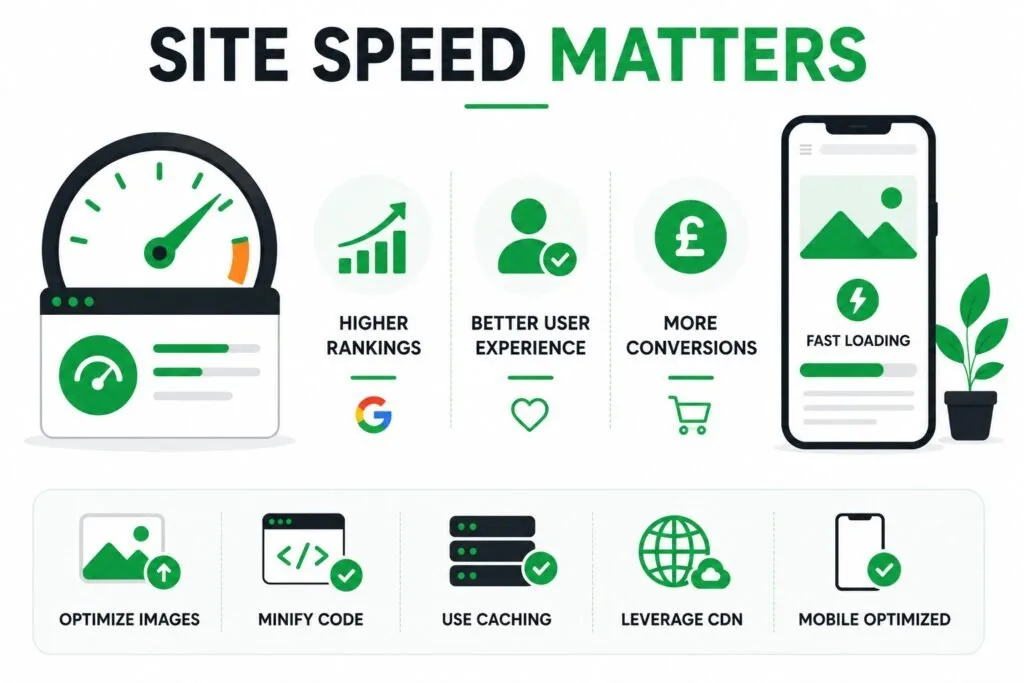
We have found that slow loading pages remain one of the most common issues across the sites we review, and the data backs this up.
Where Most Sites Fail
Roughly 72% of websites still struggle with slow page speed, and only around a third of all sites currently pass Google’s Core Web Vitals thresholds. Source: Google Chrome UX Report (CrUX).
Why Speed Affects Revenue, Not Just Rankings?
Pages that load within the top speed tier tend to see noticeably higher click through rates than pages that fail these benchmarks. Even a fractional improvement in load time has been shown to lift conversion rates by several percentage points in some industries, which makes speed a business issue, not just a technical one.
Mobile First Indexing Is Not Optional Anymore
Google evaluates and ranks based on the mobile version of a site, not the desktop version, and has done so for several years now. Despite that, a meaningful share of mid sized business websites still deliver a noticeably worse experience on mobile than on desktop. Only around a third of mobile pages currently pass all three Core Web Vitals metrics, compared to a higher pass rate on desktop. Source: Chrome UX Report (CrUX), Web Almanac.
For any business whose customers are searching primarily from a phone, and most are, a site optimized only for desktop is effectively invisible for a large portion of its own audience.
Our audits reveal that the most common mobile issues are rarely about content missing altogether. They tend to be smaller things such as text too small to read without zooming, buttons placed too close together to tap accurately, or images that were never compressed for smaller screens. None of these look catastrophic individually, but together they create the kind of frustrating experience that pushes visitors back to the search results within seconds.
Why Google Doesn’t Index Every Page?
Search engines do not crawl every page on a website infinitely often. Larger sites in particular are given a limited crawl budget.
Where That Budget Gets Wasted?
Our experience shows that sites lose a significant share of that budget to duplicate pages, broken redirect chains, or low value URLs that never should have been indexable in the first place. Redirect chains are among the most common technical SEO issues we identify during website audits. Each unnecessary redirect in a chain wastes crawl budget and can dilute the ranking signals passed to the final destination page.
Duplicate Content and Canonical Tags
A large share of technical issues we come across are not caused by anything dramatic. They come from ordinary things like URL parameters, filtered product pages, or paginated content creating multiple versions of what is essentially the same page. Search engines then have to guess which version should actually rank, and that guess does not always favour the version a business actually wants indexed.
Canonical tags exist to solve exactly this, telling search engines which version of a page is the one that matters. For example, a product page might be accessible through:
- /running-shoes
- /running-shoes?sort=price
- /running-shoes?colour=blue
Without a canonical tag, Google has to decide which version should rank. A properly configured canonical tag points search engines to the preferred version, helping consolidate ranking signals instead of splitting them across multiple URLs.
We regularly find sites with canonical tags missing entirely, or worse, pointing to the wrong page altogether. Getting this right does not require rewriting content. It simply requires making sure search engines are not left to guess.
HTTPS and Basic Site Security
This one is largely settled at this point, but still worth stating plainly because we still encounter the occasional site without it.
A site without a valid HTTPS certificate is flagged as not secure directly in the browser, which damages trust before a visitor even reads a single word, and search engines treat HTTPS as a baseline expectation rather than a bonus.
If a site is still running on HTTP, this is usually the fastest and cheapest fix on this entire list.
Why Orphan Pages Are a Hidden SEO Problem?
An orphan page is a page with no internal links pointing to it from anywhere else on the site, which makes it extremely difficult for search engines to discover or understand its importance.
A systematic internal linking audit typically uncovers a large share of pages across a site with zero internal links pointing to them, effectively hiding otherwise good content from both search engines and visitors.
Case Study: Internal Links Helped a Forgotten Page Rank
Our one client’s blog had grown to more than 80 articles, but many of the newer posts had no internal links pointing to them from anywhere else on the site. We added contextual links from older, established pages using relevant anchor text and cleaned up the site navigation.
Once Google recrawled the site, several previously invisible pages began ranking for long tail keywords they had never appeared for before, and organic traffic increased by 40% without any new content being written.
Structured Data Is Still Widely Underused
Structured data, often called schema markup, helps search engines understand exactly what a piece of content represents, whether that is a product, a review, an event, or an FAQ.
Despite its proven benefits, schema markup remains underused across many business websites. During technical SEO audits, we regularly find sites missing structured data on important pages, limiting their visibility in rich search results.
Signs Your Site Has a Technical SEO Problem
A few patterns tend to repeat across the sites we take on before working with a client.
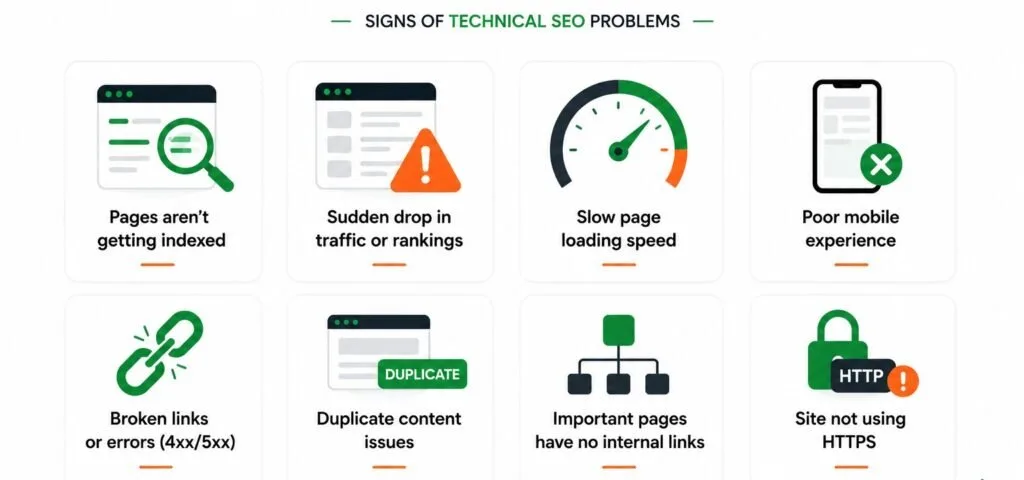
- Pages take several seconds to load, particularly on mobile devices.
- Search Console shows crawl errors, redirect chains, or indexing issues that nobody has addressed.
- Newer content rarely gets discovered or ranks, regardless of how well it is written.
- The mobile experience feels noticeably rougher than the desktop version.
- Multiple pages on the site seem to target the same content with slightly different URLs.
- Nobody on the team has checked Core Web Vitals scores in the past several months.
If several of these sound familiar, the issue is rarely the content strategy. It is what happens before Google ever gets to read that content properly.
How OutservePro Approaches Technical SEO?
As a dedicated digital marketing agency, we treat technical SEO as an ongoing discipline rather than a one time cleanup. Every site we work on is audited for crawlability, site speed, mobile performance, and structured data, then prioritized based on real impact rather than a generic checklist.
One of the most frequent issues we identify is that fixing the right handful of technical issues often unlocks more visibility than months of new content would on its own, simply because it lets Google see and properly credit what was already there.
The Bottom Line
Technical SEO rarely announces itself. There is no obvious warning when a redirect chain quietly wastes crawl budget, or when a page fails Core Web Vitals by a fraction of a second. It simply holds a site back, month after month, while content and backlink efforts struggle to make up the difference.
Every one of these issues sits within a business’s own infrastructure, which means every one of them is fixable once identified properly.
FAQ’s
Frequently Asked Questions
What’s the actual difference between technical SEO and on page SEO?
Easiest way to think about it: on page SEO is about what’s written on a page, your titles, headings, and content. Technical SEO is everything happening behind the scenes that decides whether Google can even reach that page properly in the first place. You can have perfect content sitting on a page Google barely visits.
What are Core Web Vitals, in simple terms?
Google’s way of measuring how a page actually feels to use, how fast it loads, whether things jump around while loading, and how quickly it responds when you tap or click something. Fail these, and you’re not just losing rankings, you’re losing people who get frustrated and leave.
Does mobile view really matter that much for SEO?
More than most business owners assume. Google looks at your mobile site first, not your desktop one, when deciding how to rank you. If your desktop site is great but mobile feels clunky, Google is judging you on the clunky version.
What exactly is crawl budget?
Think of it as the amount of attention Google is willing to give your site in a given stretch of time. Bigger sites with duplicate pages, broken redirects, or junk URLs end up burning that attention on pages that were never going to rank anyway, leaving less left over for the pages that actually matter.
What’s an orphan page, and why should I care?
It’s a page on your site that nothing else links to. No internal links pointing at it means Google has a much harder time finding it or figuring out it’s even important, no matter how good the content is.
Does adding structured data actually help rankings?
Not directly, What it does is help Google understand exactly what a page is, a product, a review, an FAQ, which can unlock those richer looking search results and usually pulls in more clicks even without a ranking boost.
How often should I actually be checking technical SEO?
More than once, that’s for sure. Every redesign, plugin update, or migration can quietly break something. Sites that only check this during a yearly audit are usually the ones surprised by a sudden traffic drop they can’t explain.
What’s a canonical tag, and do I really need one?
It’s basically you telling Google “this is the real version of this page, ignore the similar ones.” Without it, near duplicate pages end up splitting ranking power between them instead of one version building real authority.